Monday, October 31, 2011
Scanography
1. Multiple Scans; Rexburg; 10/29/11 7:23 PM; Epson Scanner
2. Set up one shot scan; Rexburg; 10/29/11 7:23 PM; Epson Scanner
I used the scanners down in the lab. I didn't edit them in anyway. The only thing I did was try and use a higher resolution inorder to get a sharper image. And I had the lots light so that the back ground would be dark. I think the hardest part of this was scanning my face. Especially whenever you up the resolution, it scans a lot slower so you have to sit then with your face on or close to the glass of the scanner.
Sunday, October 30, 2011
Edit
1. Legion of Ghost; Rexburg 10/30/11 4:35 PM; f/5; 1/250; Focal Length 21; Canon t2i
2. Darwin; Rexburg 10/30/11 4:45 PM; f/5; 1/125; Focal Length 18; Canon t2i
3. Pac Man Love; Rexburg 10/30/11 5:01 PM; f/4; 1/125; Focal Length 18; Canon t2i
So I went out and shot these pictures of my friends. These were their halloween costumes. It was a perfect day for shooting. But I used three different borders, on the first image I used the burnt borders effect, then the flexible brushed on effect, and lastly I used the brushed on effect. Not really much to say about them. I just followed the directions in the book.
Monday, October 24, 2011
Bannack Best

1. Blue Skies; Bannack 10/20/11 3:34 PM; F/9; 1/125; Focal Length 18; Iso 100; Canon t2i
2. Hinge; Bannack 10/20/11 3:05; F/5.6; 1/150; Focal Length 32; Iso 200; Canon t2i
3. Stairway Meade; Bannack 10/20/11 3:25 PM; F/5; 1/140; Focal Length 39; Iso 200; Canon t2i
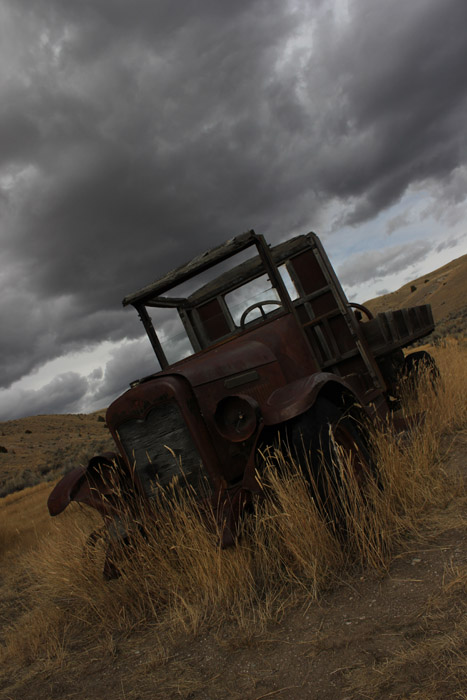
4. International Pickup; Bannack 10/20/11 4:34 PM; F/9; 1/40; Focal Length 18; Iso 100;
Canon t2i PM
5. Jenni; Bannack 10/20/11 5:15 PM; F/4; 1/40; Focal Length 27; Iso 200; Canon t2i
6. Bannack Pana; Bannack 10/20/11 3:44 PM; F/7.1; 1/200; Focal Length 27; Iso 100; Canon t2i, tripod
7. Full International; Bannack 10/20/11 4:36 PM; F/9; 1/125; Focal Length 18; Iso 100; Canon t2i
So I have a couple more that I wanted to post but I thought these 8 photos would be enough. For the Blue Skies picture I turned it into a black and white photo and had a green filter to it. I really liked how much contrast the green filter gave the image. And on all the other images besides the portrait of Jennilyn, I just bumped up the contrast and made the colors of the images more vibrate. The pano image is straight out of the camera. And the portrait I just air brushed her face so the skin tone would be a little more even, brighten up her eyes, and brought out the colors using the selective color layer.
Light Painting
1. Chair; Bannack; 10/20/11 7:05 PM; F/6.3; 25 secs; Focal Length 21; Iso 400; Canon t2i, Shutter Release Cable, Polarizer filter, tripod
2. Boots; Bannack; 10/20/11 6:55 PM; F/7.1; 1/25; Focal Length 27; Iso 400; Canon t2i; Shutter Release Cable, Polarizer filter, tripod
These were pretty interesting pictures. I had a little color lights from everyones self timers so I just went in with the heal brush tool and took all those house and warmed up the color of the light so that it didn't look so blue
HDR

1. International Truck; Bannack; 10/20/11 4:52 PM; F/9; 1/60; Focal Length 18; Iso 100; Canon t2i
2. Menacing Skies; Bannack; 10/20/11 4:45 PM; F/4; 1/1250; Focal Length 18; Iso 100; Canon t2i
HDR is something that I played with before but wasn't sure if liked it. But after using photomatix and dynamic photo I'm starting to like HDR. It just makes the color of the images pop.
Macro Abstract
Blend; Bannack; 10/20/11; F/5; 1/40; Focal Length 39; Iso 200, Canon t2i
So I just used the overlay option to blend these two images together to get more of grainy old school look. I didn't edit either image just blended them together.
Reverse Depth of Field
1. Foreground; Bannack; 10/20/11 1:20 PM, F/5; 1/40; Focal Length 40; Iso 100, Canon t2i
2. Background; Bannack; 10/20/11 1:20 PM, F/5; 1/40; Focal Length 40; Iso 100, Canon t2i
Not much to these ones. No editing done. And to get the different depths of field I just used manual focus to shift my focus from the foreground to the background.
Subscribe to:
Posts (Atom)